
Required
- BrightSign LS425
- Nexmosphere sensor
- Soundbar
- Cellular modem
- Power box + cables
- Ethernet (if needed)
1. Remove & Position Screen
⚠️ Do not lift. Do not touch LED surface.
- Place case on flat surface
- Open case
- Lower ramp
- Unlock wheel locks
- Roll screen out slowly
- Position and lock wheels
2. Unfold Screen
⚠️ Use two hands. Do not force.
- Ensure wheels are locked
- Gently pull panels open
- Fully extend screen
- Engage locks/latches
✔ Verify:
- Screen straight
- All locks engaged
3. Hardware Setup (Build Before Mounting)
Photo A – Wiring Diagram
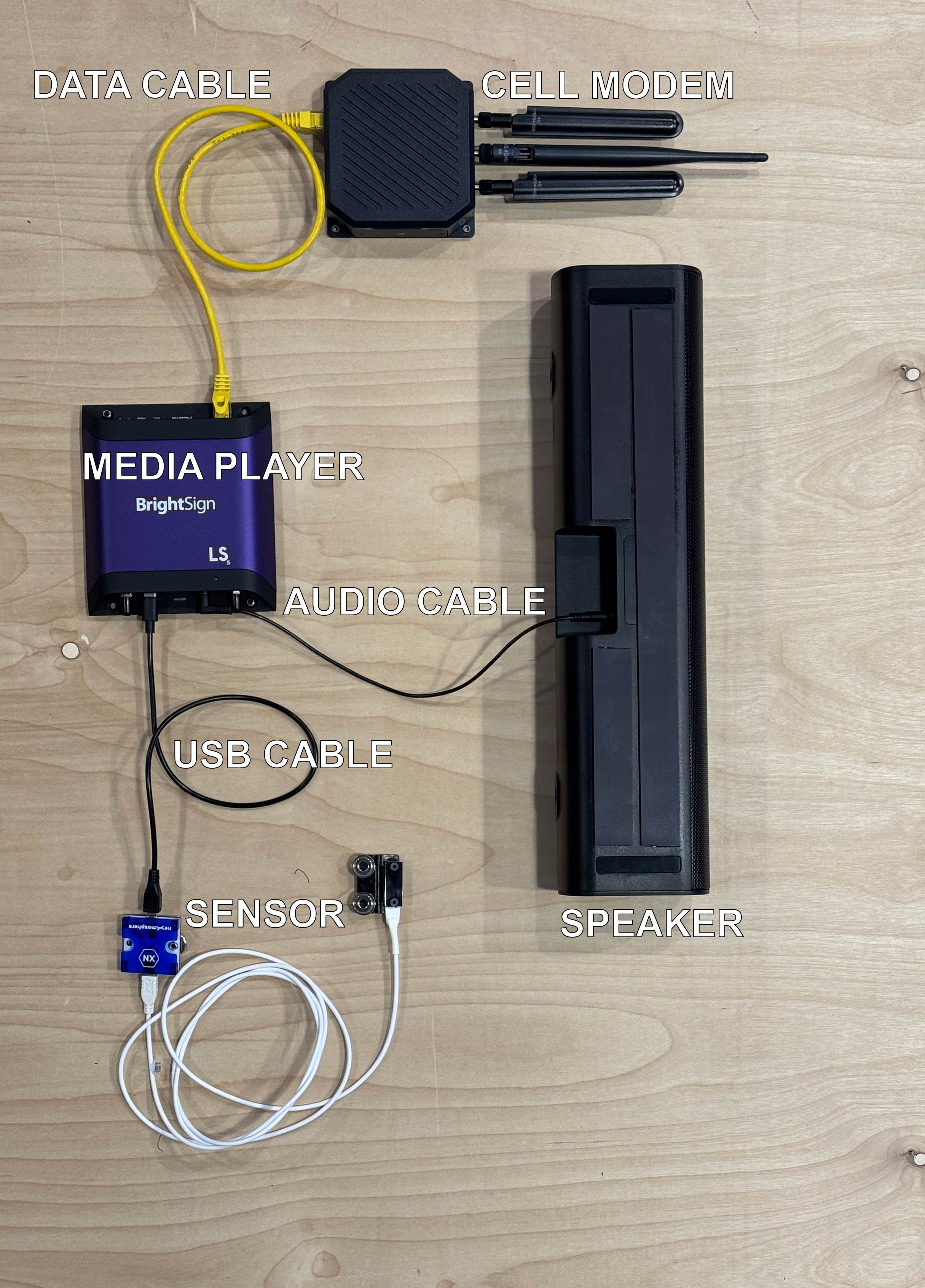
- Lay out components:
- BrightSign
- Sensor
- Soundbar
- Modem
- Power box
- Connect data (match Photo A):
- BrightSign → Sensor
- BrightSign → Soundbar
- BrightSign → Modem
4. Mount Components
- Attach all devices to base (magnets)
- Check:
- Secure mounting
- No cable strain
- Clear of wheels/hinges
5. Power Connections
⚠️ Apply wall power last
- Connect power leads to:
- BrightSign
- Soundbar
- Modem
- Screen (PowerCON)
- Plug power box → wall outlet
6. Power On & Verify
- Screen ON
- Content playing
- Audio working
- Sensor responding
- Modem powered (lights on)
7. Breakdown
- Power OFF
- Unplug wall power
- Disconnect all power cables
- Remove components from screen
- Disconnect data cables
- Fold screen
- Unlock wheels, roll into case
Critical Notes
- ⚠️ Follow Photo A exactly for wiring
- ⚠️ Build connections before mounting
- ⚠️ Do NOT transport with components attached
- ⚠️ Keep cables clear of moving parts
- ⚠️ Do NOT force hinges or connections